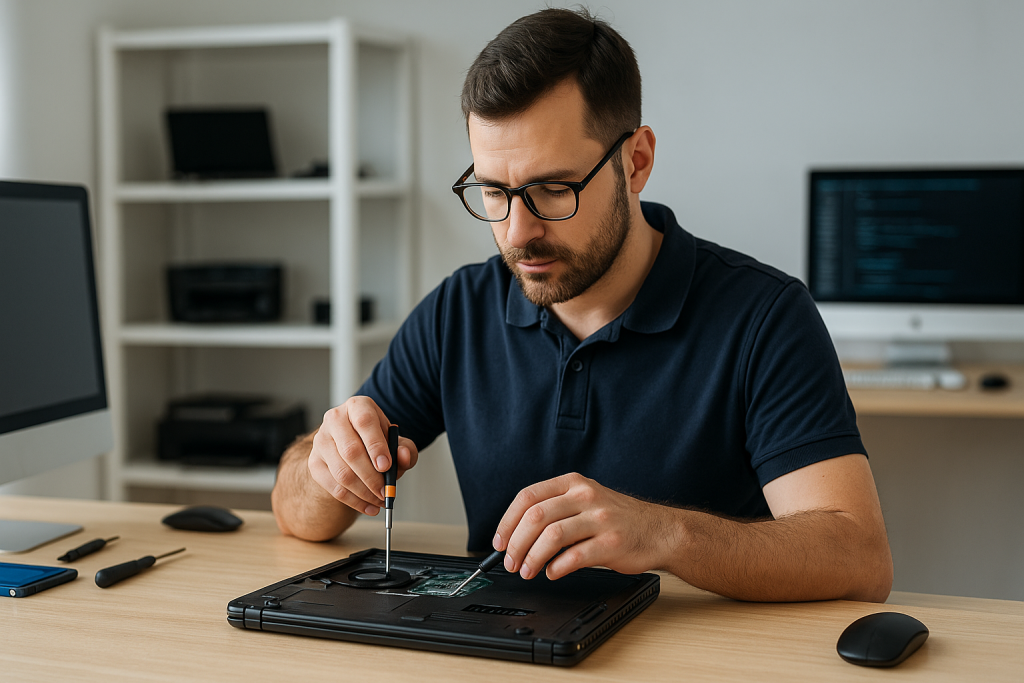

Fix Laptop Overheating Tips – Complete Expert Guide by Alam Tech
Intro: Fix Laptop Overheating Tips
Fix Laptop Overheating Tips: Laptop overheating is one of the most common and damaging problems faced by users today. Whether you are a student attending online classes, a professional working long hours, a gamer pushing hardware limits, or a business user handling daily tasks, overheating can silently reduce performance and shorten your laptop’s lifespan. At Alam Tech, we regularly diagnose and fix overheating issues, helping customers restore performance and protect their investment.
This complete guide explains why laptops overheat, how overheating affects performance, and proven tips to fix laptop overheating, based on real-world experience from Alam Tech technicians. These methods work for both budget laptops and high-performance machines.
Understanding Why Laptops Overheat
Before fixing overheating, it is important to understand why it happens. Many users assume overheating is normal, but excessive heat is a warning sign that something needs attention.
Common Causes of Laptop Overheating
Laptops overheat due to a combination of design limitations and usage habits. Some of the most common causes include dust buildup inside the cooling system, dried or poor-quality thermal paste, blocked air vents, heavy background software usage, outdated system settings, and poor airflow around the laptop.
At Alam Tech, we often find that even powerful laptops overheat simply because of dust accumulation and neglected maintenance.
Fix Laptop Overheating Tips
Compact Design and Heat Concentration
Modern laptops are thinner and more compact than ever. While this improves portability, it reduces internal airflow space. As a result, heat builds up faster, especially during multitasking, gaming, or long work sessions.
Alam Tech considers proper thermal management essential for modern slim laptops.
How Overheating Affects Laptop Performance
Overheating does not just make your laptop feel hot—it directly impacts performance and reliability.
Thermal Throttling
When a laptop gets too hot, the processor automatically reduces its speed to protect itself. This is known as thermal throttling. While it prevents damage, it causes sudden slowdowns, lag, and poor performance.
Many customers visit Alam Tech complaining about slowness, only to discover overheating is the root cause.
Sudden Shutdowns and Freezing
Excessive heat can cause laptops to shut down abruptly to prevent hardware damage. Frequent shutdowns not only disrupt work but also increase the risk of data loss.
Alam Tech treats repeated shutdowns as a serious warning sign.
Long-Term Hardware Damage
Continuous overheating shortens the lifespan of key components such as the CPU, GPU, motherboard, and battery. Batteries exposed to high temperatures degrade faster, resulting in poor battery life.
Preventing overheating is one of the most effective ways to extend laptop longevity.
First Signs Your Laptop Is Overheating
Recognizing overheating early can prevent serious damage.
Common warning signs include:
- Laptop feels extremely hot to the touch
- Fan noise becomes unusually loud
- Sudden performance drops
- Random freezes or shutdowns
- Reduced battery life
At Alam Tech, we advise users not to ignore these symptoms.
Simple Usage Habits to Reduce Overheating
Use Your Laptop on a Flat, Hard Surface
Using laptops on beds, sofas, or laps blocks airflow and traps heat. Soft surfaces cover ventilation holes, causing temperatures to rise quickly.
Alam Tech always recommends using laptops on a flat, solid surface for proper ventilation.
Avoid Blocking Air Vents
Laptop air vents are carefully placed to manage airflow. Blocking them prevents heat from escaping.
Ensure vents are always clear and unobstructed during use.
Take Breaks During Long Sessions
Continuous heavy usage builds heat faster than the cooling system can handle. Short breaks allow internal temperatures to stabilize.
This habit is especially important for gamers and professionals.
Internal Cleaning – The Most Effective Fix
Dust Is the Enemy of Cooling
Dust buildup is the number one cause of laptop overheating. Dust clogs fans and heatsinks, reducing airflow and trapping heat.
At Alam Tech, internal cleaning often results in immediate temperature reduction.
Professional Internal Cleaning
Opening a laptop without proper tools or knowledge can cause damage. Alam Tech provides professional internal cleaning using safe methods that protect delicate components.
We recommend internal cleaning at least once a year, or more frequently in dusty environments.
Thermal Paste Replacement
Why Thermal Paste Matters
Thermal paste transfers heat from the processor to the heatsink. Over time, it dries out and loses effectiveness, causing heat to remain trapped.
At Alam Tech, dried thermal paste is one of the most common causes of overheating in older laptops.
Reapplying High-Quality Thermal Paste
Replacing old thermal paste with high-quality material significantly improves heat transfer and lowers temperatures.
This process requires precision and experience, which Alam Tech technicians provide safely.
Optimize Software and Background Processes
Reduce CPU Load
Many laptops overheat not because of hardware problems, but due to unnecessary software running in the background.
Closing unused applications reduces heat generation instantly.
Manage Startup Programs
Too many startup programs increase system load even when idle. Disabling unnecessary startup applications reduces heat and improves performance.
Alam Tech optimizes startup settings for balanced performance.
Keep Operating System Optimized
Outdated or poorly configured operating systems can cause excessive CPU usage. Alam Tech ensures Windows settings are optimized to minimize heat production.
Power and Performance Settings Matter
Avoid Constant High-Performance Mode
While high-performance mode boosts speed, it also increases heat. For daily tasks, balanced power mode reduces unnecessary heat buildup.
Alam Tech helps users select the right mode for their usage.
Adjust CPU Power Limits
Limiting maximum processor usage slightly can significantly reduce heat without noticeable performance loss.
This technique is especially useful for older or budget laptops.
Improve Laptop Cooling Environment
Use Laptop Cooling Pads
Cooling pads help increase airflow and reduce surface temperature. While they are not a complete solution, they assist in maintaining stable temperatures.
Alam Tech recommends cooling pads for users who work long hours.
Improve Room Ventilation
Hot room temperatures make it harder for laptops to cool down. Using laptops in cooler environments improves thermal efficiency.
Simple changes like better airflow in the room can help.
Keep Drivers and BIOS Updated
Importance of System Firmware
BIOS and firmware updates often improve thermal management. Manufacturers release updates to optimize fan curves and power usage.
Alam Tech ensures safe updates when necessary.
Avoid Unverified Updates
Incorrect firmware updates can cause instability. Alam Tech uses only verified and compatible updates.
Storage and RAM Upgrades Can Reduce Heat
SSDs Generate Less Heat
Traditional hard drives generate more heat due to moving parts. SSDs run cooler and reduce internal temperature.
Alam Tech recommends SSD upgrades not only for speed but also for better thermal performance.
Adequate RAM Reduces CPU Strain
Insufficient RAM forces the processor to work harder, generating more heat. Upgrading RAM allows smoother multitasking and lower CPU stress.
Battery Health and Overheating
Heat Damages Batteries
Laptop batteries degrade faster when exposed to high temperatures. Overheating can cause swelling and reduced battery life.
Alam Tech checks battery health during overheating diagnosis.
Charging Habits Matter
Using laptops while charging under heavy load increases heat. Proper charging habits help control temperature.
When Overheating Requires Professional Help
Some overheating issues cannot be solved with basic tips.
Seek professional help if:
- Laptop shuts down repeatedly
- Fan noise remains loud after cleaning
- Temperatures remain high even at idle
- Laptop becomes too hot to touch
Alam Tech provides detailed diagnostics to identify underlying problems.
Preventive Maintenance for Long-Term Cooling
Regular Cleaning Schedule
Preventive cleaning prevents dust buildup and avoids severe overheating issues.
Alam Tech encourages scheduled maintenance rather than emergency repairs.
Smart Usage Practices
Balanced usage, proper ventilation, and system optimization prevent heat-related damage over time.
Why Choose Alam Tech for Overheating Solutions
Alam Tech does not offer temporary fixes. Our approach focuses on:
- Identifying the real cause of overheating
- Applying professional cleaning and thermal solutions
- Optimizing software and power settings
- Advising users on long-term prevention
We prioritize performance, safety, and durability.
Final Thoughts
Laptop overheating is not something to ignore. While some heat is normal, excessive temperatures reduce performance, damage components, and shorten lifespan. The good news is that overheating can be effectively fixed and prevented with the right care.
By following these expert tips and seeking professional support when needed, users can enjoy smooth performance, stable temperatures, and extended laptop life. Alam Tech remains committed to helping users protect their laptops through honest advice, professional service, and proven solutions.
Contact us:
Faqs on Fix Laptop Overheating Tips with Alam tech:-
1. What causes laptop overheating?
Laptop overheating is usually caused by dust buildup, blocked air vents, or high CPU usage. At Alam Tech, we often find poor airflow and lack of maintenance as the main reasons.
2. Is laptop overheating dangerous?
Yes, excessive heat can damage internal components and shorten lifespan. Alam Tech treats overheating as a serious issue that should be fixed early.
3. How do I know if my laptop is overheating?
Signs include loud fan noise, sudden slowdowns, frequent shutdowns, and hot surfaces. Alam Tech recommends immediate attention when these symptoms appear.
4. Can overheating slow down my laptop?
Yes, overheating causes thermal throttling which reduces performance. Alam Tech often resolves slowness by fixing temperature issues.
5. Does dust cause laptop overheating?
Dust is one of the biggest causes of overheating. Alam Tech regularly cleans dust-clogged fans and heatsinks to restore airflow.
6. How often should laptops be cleaned internally?
Internal cleaning is recommended at least once a year. Alam Tech suggests more frequent cleaning in dusty environments.
7. Can laptop overheating damage the battery?
Yes, heat accelerates battery degradation and reduces backup time. Alam Tech checks battery health during overheating diagnosis.
8. Why does my laptop fan run loudly?
Loud fan noise usually means the system is trying to cool down excess heat. Alam Tech inspects fans and cooling systems to fix this.
9. Does gaming cause laptop overheating?
Gaming puts heavy load on CPU and GPU, generating more heat. Alam Tech optimizes gaming laptops for better cooling.
10. Can overheating cause sudden shutdowns?
Yes, laptops shut down automatically to prevent heat damage. Alam Tech treats repeated shutdowns as an urgent issue.
11. Is it safe to use a laptop on the bed?
No, soft surfaces block ventilation and trap heat. Alam Tech advises using laptops on flat, hard surfaces.
12. Do cooling pads help reduce overheating?
Cooling pads help improve airflow and reduce surface temperature. Alam Tech recommends them as a supporting solution.
13. Can old thermal paste cause overheating?
Yes, dried thermal paste prevents proper heat transfer. Alam Tech replaces thermal paste to improve cooling efficiency.
14. How long does thermal paste last?
Thermal paste usually lasts 2–3 years. Alam Tech checks and replaces it during servicing.
15. Is laptop overheating normal?
Some heat is normal, but excessive heat is not. Alam Tech helps identify when temperatures are unsafe.
16. Can software cause laptop overheating?
Yes, unnecessary background software increases CPU load. Alam Tech optimizes software to reduce heat.
17. Does Windows performance affect laptop temperature?
Poorly optimized Windows settings can increase heat. Alam Tech configures systems for balanced performance.
18. Can startup programs increase overheating?
Yes, too many startup programs increase system load. Alam Tech disables unnecessary startup apps.
19. Does SSD reduce laptop heat?
Yes, SSDs generate less heat than HDDs. Alam Tech recommends SSD upgrades for better cooling.
20. Does RAM upgrade help reduce overheating?
Adequate RAM reduces CPU stress and heat generation. Alam Tech installs compatible RAM upgrades.
21. Can BIOS updates fix overheating?
Some BIOS updates improve thermal management. Alam Tech performs safe and verified updates only.
22. Is laptop overheating common in summer?
Yes, high room temperatures make cooling harder. Alam Tech advises extra care during hot seasons.
23. Can blocked vents cause overheating?
Yes, blocked vents prevent heat from escaping. Alam Tech ensures vents are always clear.
24. Does multitasking increase laptop heat?
Heavy multitasking increases processor load and heat. Alam Tech helps balance workloads.
25. Is internal fan cleaning necessary?
Yes, fan cleaning improves airflow. Alam Tech uses professional tools for safe cleaning.
26. Can overheating damage the motherboard?
Prolonged overheating can damage motherboard components. Alam Tech prevents this through timely repairs.
27. Should I stop using my laptop if it overheats?
Yes, continuing to use an overheated laptop risks damage. Alam Tech recommends cooling and inspection.
28. Does battery charging increase laptop heat?
Charging under heavy load increases heat. Alam Tech advises smart charging habits.
29. Can old laptops overheat more?
Yes, older laptops often have worn cooling systems. Alam Tech specializes in restoring older systems.
30. Can undervolting reduce overheating?
Yes, undervolting reduces heat without affecting performance. Alam Tech performs safe optimization when suitable.
31. Does fan replacement fix overheating?
If the fan is faulty, replacement helps. Alam Tech checks fan health thoroughly.
32. Is laptop overheating repair expensive?
Not always. Alam Tech offers cost-effective overheating solutions.
33. Can poor ventilation damage laptop performance?
Yes, poor ventilation traps heat. Alam Tech ensures proper airflow.
34. Does background syncing increase heat?
Yes, constant syncing uses system resources. Alam Tech optimizes sync settings.
35. Can overheating affect gaming performance?
Yes, heat reduces gaming stability and FPS. Alam Tech optimizes gaming laptops.
36. Is it safe to clean laptop fans at home?
Improper cleaning can damage components. Alam Tech recommends professional cleaning.
37. Can virus infections cause overheating?
Yes, malware increases CPU usage. Alam Tech removes infections safely.
38. Does laptop overheating reduce lifespan?
Yes, constant heat shortens component life. Alam Tech focuses on long-term protection.
39. Is fan noise always a sign of overheating?
Usually yes, but sometimes fans are clogged. Alam Tech diagnoses the exact cause.
40. Can thermal pads help cooling?
Thermal pads help in specific areas. Alam Tech uses correct materials based on design.
41. Can laptop cases affect overheating?
Hard cases with ventilation holes are safe. Alam Tech warns against poorly ventilated covers.
42. Does using external monitor increase heat?
It can increase GPU usage slightly. Alam Tech optimizes display settings.
43. Can overheating affect SSD performance?
Extreme heat can reduce SSD lifespan. Alam Tech ensures proper airflow.
44. Is airflow important for thin laptops?
Yes, thin laptops require efficient cooling. Alam Tech customizes solutions for slim designs.
45. Can overheating cause keyboard damage?
High heat can affect internal keyboard components. Alam Tech prevents such damage.
46. Should laptops be serviced regularly?
Yes, regular servicing prevents major issues. Alam Tech recommends preventive maintenance.
47. Can power settings reduce overheating?
Yes, balanced power settings reduce unnecessary heat. Alam Tech configures optimal modes.
48. Does sunlight increase laptop temperature?
Yes, direct sunlight heats the chassis quickly. Alam Tech advises avoiding sun exposure.
49. Can laptop overheating cause blue screen errors?
Yes, thermal instability can cause system crashes. Alam Tech investigates overheating-related errors.
50. Is internal dust visible from outside?
Usually no. Alam Tech opens and inspects internally for accurate diagnosis.
51. Can gaming laptops overheat more?
Yes, powerful components generate more heat. Alam Tech optimizes gaming cooling systems.
52. Does fan speed control help?
Proper fan curves improve cooling. Alam Tech adjusts fan behavior safely.
53. Can overheating affect Wi-Fi performance?
Yes, heat can impact internal components. Alam Tech checks overall system health.
54. Can laptop overheating damage speakers?
Extreme heat may affect speaker wiring. Alam Tech prevents long-term damage.
55. Does system clutter increase heat?
Yes, inefficient software increases load. Alam Tech cleans system clutter.
56. Can laptop stands help reduce heat?
Yes, stands improve airflow underneath. Alam Tech recommends proper stands.
57. Should I shut down overheated laptop immediately?
Yes, shutting down allows safe cooling. Alam Tech advises cooling before reuse.
58. Can overheating affect touchpad performance?
Yes, heat may affect internal sensors. Alam Tech checks all affected components.
59. Is thermal throttling reversible?
Yes, fixing cooling issues restores performance. Alam Tech handles this professionally.
60. Does ambient temperature matter?
Yes, hot environments worsen overheating. Alam Tech advises cooler usage environments.
61. Can overheating affect external devices?
Heat can cause USB instability. Alam Tech resolves underlying issues.
62. Should fans always run loudly?
No, loud fans indicate stress. Alam Tech restores normal fan operation.
63. Can overheating cause data loss?
Yes, sudden shutdowns risk data corruption. Alam Tech emphasizes timely repair.
64. Can laptop overheating be prevented completely?
While heat is unavoidable, excessive overheating can be prevented. Alam Tech provides preventive solutions.
65. Is professional diagnosis better than guesswork?
Yes, guessing can worsen issues. Alam Tech provides accurate diagnostics.
66. Can overheating affect webcam quality?
Heat may impact internal circuits. Alam Tech checks full system health.
67. Is fan lubrication necessary?
Some fans require lubrication or replacement. Alam Tech evaluates fan condition.
68. Can overheating cause screen flickering?
Yes, thermal stress affects graphics components. Alam Tech inspects GPU health.
69. Does overheating affect long-term performance?
Yes, prolonged heat permanently reduces efficiency. Alam Tech focuses on prevention.
70. Why trust Alam Tech for overheating solutions?
Alam Tech combines expert technicians, proper tools, and honest advice. We fix the root cause, not just symptoms.