
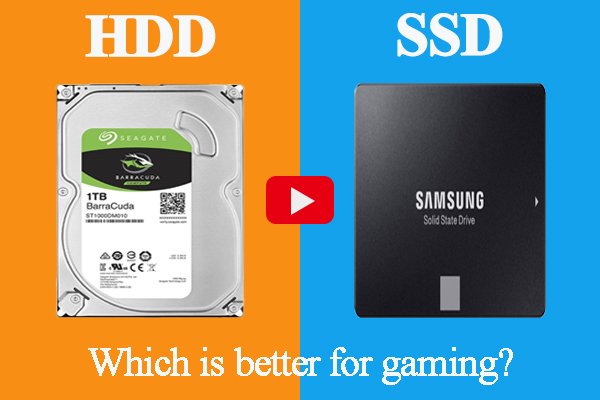

SSD vs HDD for Gaming in Nepal – Which Is Better? Complete Guide by Alam Tech
Introduction: SSD vs HDD for Gaming
SSD vs HDD for Gaming: When building or upgrading a gaming PC, storage is one of the most important decisions gamers in Nepal often overlook. Many gamers focus heavily on graphics cards and processors, but the type of storage you choose—SSD or HDD—can completely change your gaming experience. At Alam Tech, we help gamers every day make the right storage choice based on performance, budget, and long-term value.
This detailed guide explains SSD vs HDD for gaming, how each affects gameplay, loading times, system responsiveness, and overall performance. Whether you are a casual gamer, competitive esports player, or AAA title enthusiast, this article will help you decide wisely.
Understanding Storage in Gaming PCs
Storage is where your operating system, games, and files live. In gaming, storage directly affects:
- Game loading speed
- Level transition times
- Texture streaming
- System boot time
- Game update installation
- Overall system responsiveness
At Alam Tech, we see many gamers upgrading GPUs while still using slow storage, unknowingly limiting their system’s potential.
SSD vs HDD for Gaming
What Is an HDD?
A Hard Disk Drive (HDD) is traditional mechanical storage that uses spinning platters and a moving read/write head to access data.
Key Characteristics of HDD
- Mechanical moving parts
- Slower read/write speeds
- Larger storage capacity at lower cost
- More prone to physical wear
HDDs have been used for decades and are still popular in Nepal due to affordability.
What Is an SSD?
A Solid State Drive (SSD) uses flash memory with no moving parts. Data is accessed electronically, making SSDs significantly faster and more reliable.
Key Characteristics of SSD
- No moving parts
- Extremely fast read/write speeds
- Silent operation
- Lower power consumption
- Higher durability
At Alam Tech, SSDs are the most requested upgrade among gamers once they experience the difference firsthand.
SSD vs HDD: Core Technical Differences
| Feature | SSD | HDD |
|---|---|---|
| Speed | Very fast | Slow |
| Durability | High | Moderate |
| Noise | Silent | Audible |
| Power Use | Low | Higher |
| Heat | Minimal | More |
| Boot Time | Seconds | Minutes |
| Game Loading | Instant | Long |
Impact on Game Loading Times
HDD Gaming Experience
Games installed on HDD take significantly longer to load. Open-world games suffer the most, with frequent loading pauses and delayed texture rendering.
SSD Gaming Experience
With SSDs, games load dramatically faster. Large titles launch in seconds, and fast travel becomes nearly instant.
At Alam Tech, customers switching from HDD to SSD often say it feels like upgrading an entire PC.
Open-World Games: SSD vs HDD
Modern open-world games constantly stream data while you move through the environment.
HDD Limitations
- Texture pop-ins
- Delayed asset loading
- Occasional stuttering
SSD Advantage
- Smooth exploration
- Instant texture loading
- Stable frame pacing
Games like RPGs, survival titles, and open-world shooters benefit massively from SSDs.
Competitive Gaming Performance
HDD for Competitive Gaming
While FPS may not change, loading into matches takes longer. This matters in competitive environments where quick restarts are crucial.
SSD for Competitive Gaming
- Faster match loading
- Quicker system response
- Reduced background lag
At Alam Tech, competitive gamers almost always choose SSDs for consistency.
Does SSD Increase FPS?
A common question at Alam Tech is whether SSDs increase FPS.
Honest Answer
SSDs do not directly increase FPS, but they:
- Reduce stutter
- Improve frame stability
- Eliminate asset loading delays
The result is smoother gameplay, especially in demanding games.
Game Installation and Updates
HDD
- Slow game installation
- Long update times
- Frequent disk usage spikes
SSD
- Faster installs
- Rapid updates
- Minimal waiting
For gamers in Nepal with limited free time, SSDs save hours over months of use.
Boot Time and System Responsiveness
HDD Boot Experience
- 1–3 minutes boot time
- Slow desktop responsiveness
SSD Boot Experience
- 10–20 seconds boot
- Instant application launch
At Alam Tech, we never recommend HDD as a primary drive for gaming PCs anymore.
Noise and Heat Considerations
HDD
- Audible spinning noise
- Generates more heat
SSD
- Completely silent
- Minimal heat output
For gaming setups focused on comfort and long sessions, SSDs are clearly superior.
Reliability and Durability
HDD Risks
- Mechanical failure
- Sensitive to movement and shocks
SSD Reliability
- Resistant to vibration
- Longer lifespan for gaming workloads
Gamers who transport PCs or laptops benefit greatly from SSD durability.
Storage Capacity Considerations
HDD Advantage
HDDs offer large storage at lower cost, making them suitable for:
- Game backups
- Media storage
- Archiving
SSD Limitation
SSDs cost more per GB but provide unmatched performance.
At Alam Tech, we often recommend a hybrid setup.
Best Storage Setup for Gaming (Recommended by Alam Tech)
Ideal Configuration
- SSD for OS + Games
- HDD for storage and backups
This combination delivers performance without breaking the budget.
SSD Types for Gaming
SATA SSD
- Faster than HDD
- Affordable
- Great upgrade option
NVMe SSD
- Ultra-fast
- Best for modern gaming
- Ideal for high-end builds
Alam Tech offers both options based on budget and performance needs.
Laptop Gaming: SSD vs HDD
Gaming laptops benefit even more from SSDs due to:
- Lower power usage
- Reduced heat
- Faster wake times
At Alam Tech, gaming laptops with HDD are rarely recommended today.
Budget Gaming Builds in Nepal
HDD-Only Build
- Lowest cost
- Acceptable for casual gaming
SSD-Based Build
- Higher upfront cost
- Massive long-term value
Gamers upgrading later always say they wish they chose SSD earlier.
Future-Proofing Your Gaming PC
Modern games are increasingly designed with SSDs in mind.
Future titles:
- Require faster asset streaming
- Expect SSD-level performance
At Alam Tech, we strongly recommend SSDs for future readiness.
Console Gaming vs PC Gaming Storage
Even modern consoles now rely heavily on SSDs, proving that:
- SSD is the future of gaming
- HDD is slowly becoming secondary storage
PC gamers benefit even more due to flexibility.
Why Alam Tech Recommends SSD for Gaming
At Alam Tech, we base recommendations on:
- Real-world testing
- Customer feedback
- Long-term performance
Our experience shows SSDs dramatically improve gaming satisfaction.
Choosing the Right SSD at Alam Tech
When selecting an SSD, consider:
- Storage capacity
- Interface (SATA or NVMe)
- Gaming library size
- Budget
Our team helps customers find the perfect balance.
SSD vs HDD: Final Verdict for Gamers in Nepal
Choose HDD if:
- You need large storage cheaply
- You play few games casually
Choose SSD if:
- You want fast loading
- You play modern games
- You value smooth performance
For most gamers today, SSD is the clear winner.
Final Thoughts from Alam Tech
Gaming is about experience, not just specs. Storage directly shapes how your games feel, load, and perform. At Alam Tech, we believe every gamer deserves smooth, responsive gameplay, and that starts with choosing the right storage.
If you are building a new gaming PC or upgrading an old one, choosing SSD over HDD is one of the most impactful upgrades you can make.
Contact us:
SSD vs HDD for Gaming – Frequently Asked Questions (FAQs)
Q1. What is the main difference between SSD and HDD for gaming?
SSD uses flash memory with no moving parts, making it much faster than HDD. HDD relies on spinning disks, which results in slower loading times and performance delays in games.
Q2. Does SSD improve gaming performance?
SSD does not increase FPS directly, but it significantly improves loading times, reduces stutter, and provides smoother gameplay. Games feel more responsive and stable on SSDs.
Q3. Is HDD still good for gaming in 2025?
HDD can still run games, but it is no longer ideal for modern titles. Newer games are designed to work best with faster storage like SSD.
Q4. Which is better for gaming, SSD or HDD?
SSD is clearly better for gaming due to faster load times, smoother asset streaming, and better overall experience. HDD is best used only for storage or backups.
Q5. Will games load faster on SSD?
Yes, games installed on SSD load dramatically faster compared to HDD. Large games that take minutes on HDD may load in seconds on SSD.
Q6. Can SSD reduce lag in games?
SSD can reduce stuttering and lag caused by slow data loading. It improves consistency, especially in open-world and large multiplayer games.
Q7. Does SSD make open-world games smoother?
Yes, open-world games benefit greatly from SSDs because assets load instantly while moving through the game world. HDDs often cause texture pop-ins and delays.
Q8. Is SSD necessary for modern games?
While not always mandatory, SSD is highly recommended for modern games. Many new titles are optimized assuming SSD-level speeds.
Q9. Can I play games directly from HDD?
Yes, games can be played from HDD, but loading times will be much longer. Performance may also suffer in texture-heavy games.
Q10. Does SSD affect FPS stability?
SSD helps maintain stable frame pacing by reducing data bottlenecks. This leads to smoother gameplay even if FPS remains the same.
Q11. Which games benefit most from SSD?
Open-world, RPGs, battle royale, and AAA titles benefit the most. These games constantly load data during gameplay.
Q12. Are competitive games better on SSD?
Yes, competitive games load faster and restart quicker on SSD. This improves overall responsiveness and reduces downtime between matches.
Q13. Is SSD good for esports players?
Absolutely. Esports players benefit from fast system response, quick match loading, and minimal delays.
Q14. Does SSD reduce game installation time?
Yes, SSD significantly speeds up game installation and update processes. Large patches install much faster than on HDD.
Q15. Does SSD improve system boot time?
SSD drastically reduces boot time, often starting Windows within seconds. HDD systems usually take much longer to boot.
Q16. Is SSD quieter than HDD?
Yes, SSD is completely silent since it has no moving parts. HDD produces spinning and clicking sounds during operation.
Q17. Does SSD generate less heat?
SSD produces much less heat than HDD. This helps maintain better overall system temperature during gaming.
Q18. Which lasts longer, SSD or HDD?
SSDs generally last longer because they have no mechanical components. HDDs are more prone to physical wear and failure.
Q19. Is SSD safer for laptops?
Yes, SSD is safer for laptops because it is shock-resistant. HDDs can fail if the laptop is moved while running.
Q20. Can SSD improve multitasking during gaming?
Yes, SSD allows faster background tasks such as streaming, recording, or browsing while gaming without slowdowns.
Q21. What storage size is best for gaming SSD?
At least 500GB SSD is recommended for gaming. Modern games are large, and smaller SSDs fill up quickly.
Q22. Is 256GB SSD enough for gaming?
256GB SSD is limited and only suitable for a few games. It fills up fast with modern AAA titles.
Q23. Should I use both SSD and HDD together?
Yes, this is the best setup. Use SSD for games and OS, and HDD for storage and backups.
Q24. Which SSD type is best for gaming?
NVMe SSD is the best for gaming due to extremely fast speeds. SATA SSD is still a huge upgrade over HDD.
Q25. Is NVMe better than SATA SSD for gaming?
NVMe is faster, but SATA SSD already offers excellent gaming performance. NVMe is ideal for high-end systems.
Q26. Does gaming require NVMe SSD?
No, NVMe is not mandatory, but it offers faster load times. SATA SSD is sufficient for most gamers.
Q27. Are SSDs expensive in Nepal?
SSDs are more expensive than HDDs but offer much better value. Prices have become more affordable in recent years.
Q28. Is HDD cheaper than SSD?
Yes, HDD is cheaper per GB. However, performance difference makes SSD a better long-term investment.
Q29. Can HDD be used as secondary storage?
Yes, HDD is perfect for storing videos, photos, and rarely played games.
Q30. Should budget gamers choose SSD?
Yes, even budget gamers benefit greatly from SSD. It is one of the best upgrades for gaming performance.
Q31. Does SSD help with game streaming?
Yes, SSD improves streaming by reducing system load and speeding up background tasks.
Q32. Is SSD important for content creators who game?
Yes, SSD helps with faster file access, smoother editing, and better multitasking.
Q33. Does SSD improve Windows performance?
SSD makes Windows feel faster, more responsive, and smoother overall.
Q34. Can SSD improve loading screens in games?
Yes, loading screens become much shorter or nearly instant on SSD.
Q35. Are SSDs good for long gaming sessions?
Yes, SSDs remain stable and cool during long sessions, unlike HDDs that heat up more.
Q36. Does SSD improve texture loading?
Yes, textures load instantly on SSD, preventing pop-ins and blurry visuals.
Q37. Is SSD future-proof for gaming?
Yes, SSD is essential for future games as developers rely on faster storage.
Q38. Are next-gen games designed for SSD?
Yes, many next-gen games assume SSD speeds for optimal performance.
Q39. Is HDD becoming obsolete for gaming?
HDD is slowly becoming secondary storage. SSD is becoming the standard for gaming.
Q40. Does SSD help with game crashes?
SSD can reduce crashes caused by slow data access, but it does not fix software bugs.
Q41. Is SSD required for Windows 11 gaming?
While not mandatory, SSD is highly recommended for Windows 11 performance and gaming.
Q42. Can SSD reduce loading stutter?
Yes, SSD significantly reduces stutter caused by slow asset loading.
Q43. Is SSD better for multiplayer games?
Yes, faster loading and smoother performance make SSD better for multiplayer gaming.
Q44. Should gaming laptops always have SSD?
Yes, SSD is strongly recommended for gaming laptops due to speed and power efficiency.
Q45. Does SSD improve battery life in laptops?
Yes, SSD consumes less power, helping improve battery efficiency.
Q46. Is SSD upgrade worth it?
Yes, SSD upgrade offers the biggest performance boost compared to other upgrades.
Q47. Can SSD improve old gaming PCs?
Yes, upgrading to SSD can make an old gaming PC feel new again.
Q48. Does SSD require maintenance?
No, SSD requires very little maintenance compared to HDD.
Q49. Is SSD reliable for long-term gaming?
Yes, SSDs are highly reliable and durable for long-term use.
Q50. Does SSD affect game save loading?
Yes, game saves load much faster on SSD.
Q51. Can SSD handle large game libraries?
Yes, with proper capacity planning. Larger SSDs are ideal for big libraries.
Q52. Should casual gamers choose SSD?
Yes, even casual gamers benefit from faster load times and smoother performance.
Q53. Does SSD improve console-style gaming on PC?
Yes, SSD offers console-like fast loading and smooth transitions.
Q54. Is SSD necessary for VR gaming?
Yes, VR gaming benefits greatly from SSD due to real-time data loading.
Q55. Does SSD improve modded games?
Yes, heavily modded games load faster and run smoother on SSD.
Q56. Can SSD reduce in-game freezes?
Yes, SSD reduces freezes caused by slow disk access.
Q57. Is HDD noisy during gaming?
Yes, HDD can be noisy during heavy usage. SSD is silent.
Q58. Does SSD help with background downloads?
Yes, SSD handles background downloads without affecting gameplay much.
Q59. Can SSD replace HDD completely?
Yes, many gamers now use only SSDs. HDD is optional for extra storage.
Q60. Is SSD better for dual-boot gaming systems?
Yes, SSD improves boot switching speed and system responsiveness.
Q61. Does SSD help with faster alt-tabbing?
Yes, SSD allows smoother switching between games and other applications.
Q62. Is SSD good for gaming cafes?
Yes, SSD improves customer experience with faster load times.
Q63. Does SSD increase resale value of gaming PC?
Yes, PCs with SSD are more valuable and attractive to buyers.
Q64. Is SSD safer during power cuts?
SSD is less prone to damage during sudden power loss compared to HDD.
Q65. Does SSD improve patch download handling?
Yes, SSD processes game patches faster and more efficiently.
Q66. Is SSD essential for large multiplayer games?
Yes, large multiplayer games benefit from faster loading and reduced lag.
Q67. Does SSD help reduce queue times?
SSD helps you load faster once matchmaking is complete, reducing downtime.
Q68. Is SSD recommended by Alam Tech for gaming?
Yes, Alam Tech strongly recommends SSD for all modern gaming setups.
Q69. What is the biggest advantage of SSD over HDD?
Speed is the biggest advantage. It transforms the entire gaming experience.
Q70. Final recommendation: SSD or HDD for gaming?
SSD is the clear choice for gaming today. HDD should only be used as secondary storage.






 Apple MacBook

