
Blog
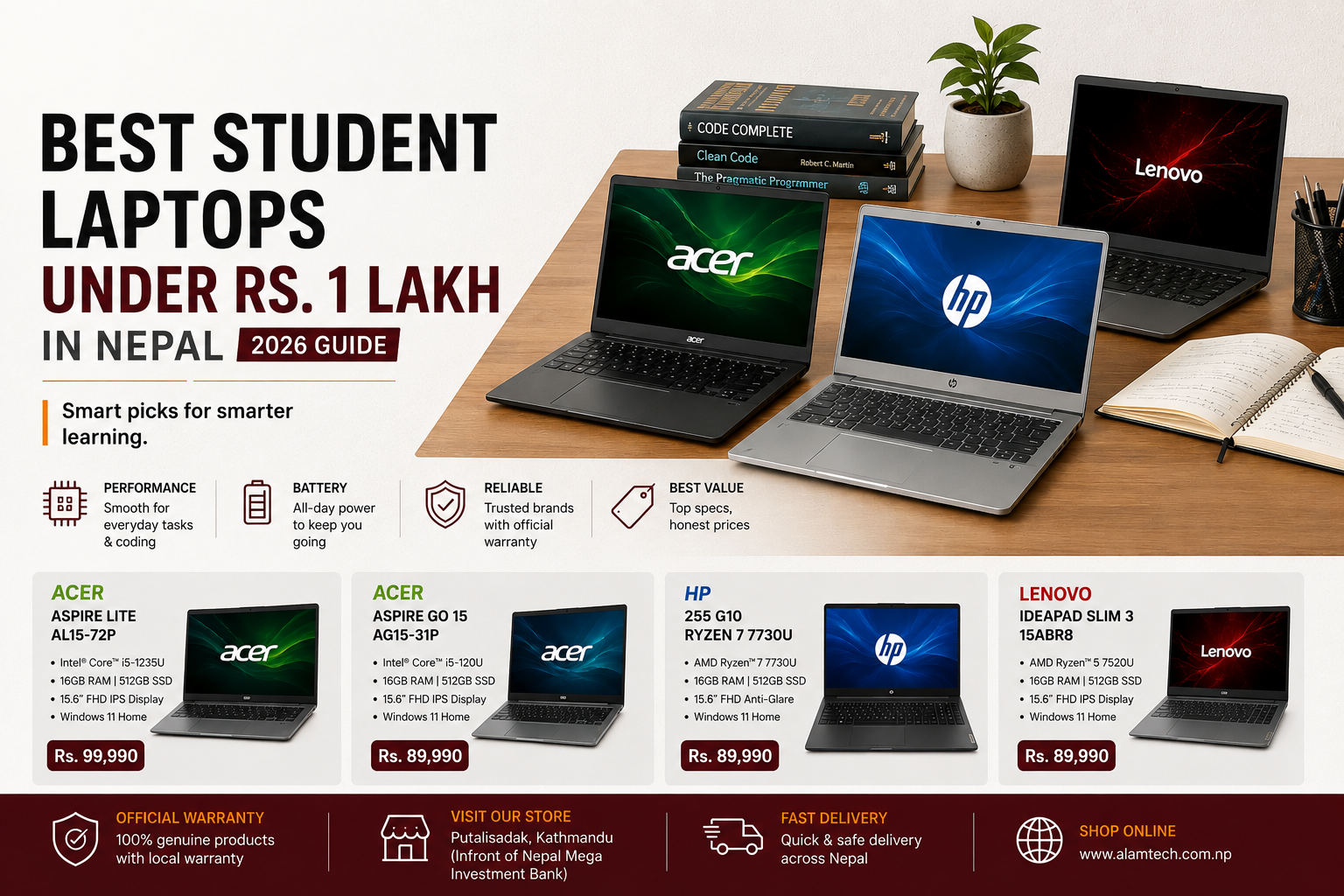
Best Student Laptops Under Rs. 1 Lakh in Nepal (2026) | BCA, CSIT & More

Buying a laptop for college in Nepal is not simply about finding the highest processor number under Rs. 100,000. A good student laptop needs enough performance for programming, browser-heavy research, assignments, presentations, video meetings and everyday multitasking while remaining practical to carry to class.
For students, 16GB RAM, SSD storage, a modern processor and a comfortable display usually matter more than buying the laptop with the biggest name or the highest advertised clock speed.
This guide compares selected laptops available at Alam Tech under Rs. 1 lakh and matches them to real student use cases, including BCA, BSc CSIT, BIT, BBA, BBS, engineering and general university study.
Quick Answer: Which Laptop Should a Student Buy Under Rs. 1 Lakh?
For most students, the best choice depends on what you study. IT and computer-science students should prioritize CPU performance and 16GB RAM, while management and general students can put more weight on portability, keyboard comfort and battery life.
- Best for BCA, BSc CSIT and coding:
Acer Aspire Lite AL15-72P with Intel Core i5-13420H
- Best all-round student option:
Acer Aspire Go 15 with Intel Core 5 120U
- Best AMD value option:
Acer Aspire Lite AL15-41 Ryzen 5 7430U
- Best for office and heavy multitasking:
HP 255 G10 Ryzen 7 7730U
- Best budget-friendly student choice:
Lenovo IdeaPad Slim 3 Ryzen 5 7520U
Best Student Laptops Under Rs. 1 Lakh at a Glance
| Laptop | Price | Processor | RAM / Storage | Best For |
|---|---|---|---|---|
Acer Aspire Lite AL15-72P |
Rs. 99,990 | Intel Core i5-13420H | 16GB / 512GB SSD | BCA, BSc CSIT, programming |
Acer Aspire Go 15 |
Rs. 99,990 | Intel Core 5 120U | 16GB / 512GB SSD | Everyday study, office, web development |
HP 255 G10 |
Rs. 99,990 | AMD Ryzen 7 7730U | 16GB / 512GB SSD | Multitasking, office, development |
Acer Aspire Lite AL15-41 |
Rs. 89,990 | AMD Ryzen 5 7430U | 16GB / 512GB SSD | Value, students, productivity |
Lenovo IdeaPad Slim 3 |
Rs. 89,990 | AMD Ryzen 5 7520U | 16GB / 512GB SSD | BBA, BBS, general university use |
What Actually Matters in a Student Laptop Under Rs. 1 Lakh?
Before comparing brands, look at the components that will affect your daily experience for the next three to four years.
1. Processor
For students, a modern Core 5, Core i5 or Ryzen 5/7 processor is usually the sensible target. Computer-science students running Android Studio, compilers, Docker, databases and many browser tabs should prioritize stronger CPU performance over cosmetic features.
2. RAM
16GB RAM should be the target in 2026. An 8GB laptop can still handle basic Office work and browsing, but 16GB gives much more breathing room for programming, multiple browser tabs, development tools, virtual machines and long-term use.
3. SSD Storage
A 512GB NVMe SSD is the practical starting point for most students. It gives you enough room for Windows, development software, documents and a reasonable collection of applications without the sluggishness associated with older hard drives.
4. Display
For long study sessions, look for at least a Full HD display with a comfortable size and good viewing angles. A sharp display matters more than a high refresh rate for students who spend most of their day reading documents, writing code or working in Office applications.
5. Upgradeability
Check whether RAM and storage can be upgraded before buying. A laptop that lets you expand memory or add storage can remain useful much longer than a system with everything permanently fixed.
Which Laptop Is Best for Your Degree?
| Student Type | Recommended Laptop | Why |
|---|---|---|
| BCA / BSc CSIT / BIT | Acer Aspire Lite AL15-72P | Stronger H-series CPU and 16GB RAM suit programming and heavier development workloads. |
| Engineering | HP 255 G10 / Acer Aspire Lite AL15-72P | Good CPU headroom for programming, technical software and multitasking. |
| BBA / BBS / Management | Lenovo IdeaPad Slim 3 | Strong everyday performance without spending the full Rs. 1 lakh. |
| General University Use | Acer Aspire Go 15 | Modern processor, 16GB RAM and 512GB SSD provide a balanced daily-use package. |
The Best Student Laptops Under Rs. 1 Lakh in Nepal
The five models below cover the strongest buying cases for students under Rs. 1 lakh: programming and IT degrees, general university work, office productivity, multitasking, and value-focused buying.
1. Acer Aspire Lite AL15-72P — Best for BCA, BSc CSIT & Programming
Price: Rs. 99,990
For students studying BCA, BSc CSIT, BIT, software engineering or other computer-focused courses, the Acer Aspire Lite AL15-72P with Intel Core i5-13420H is the strongest performance-oriented option in this group.
The most important part is the processor. The Core i5-13420H belongs to Intel’s H-series rather than the lower-power U-series, giving this laptop a stronger performance profile for workloads that keep the CPU busy for longer periods.
That makes it particularly interesting for students who regularly work with development environments, compilers, IDEs, browser-heavy research, databases and other demanding software at the same time.
The configuration also includes 16GB RAM and a 512GB SSD, which is exactly the kind of configuration we want to see in a student laptop intended to remain useful for several years.
Why students should consider it
- Strong CPU-focused configuration for programming and multitasking
- 16GB RAM is suitable for modern development workloads
- 512GB SSD provides practical day-to-day storage
- Excellent choice for computer-science students under Rs. 1 lakh
Who should skip it
Students whose work is mainly Microsoft Office, web browsing, presentations and video calls may not need an H-series processor. In that case, spending less on a more balanced model can make more sense.
2. Acer Aspire Go 15 Core 5 120U — Best All-Round Student Laptop
Price: Rs. 99,990
The Acer Aspire Go 15 with Intel Core 5 120U is the more balanced choice for students who don’t need maximum sustained CPU performance but still want a modern processor and plenty of memory.
With 16GB RAM and 512GB SSD storage, it is well suited to everyday university workloads such as research, Office applications, web development, online classes, presentations, media consumption and general multitasking.
This is the type of laptop that makes sense for students who want one machine for both academic work and normal day-to-day use rather than a system built around a particularly demanding workload.
Why students should consider it
- Modern Intel Core 5 platform
- 16GB RAM provides comfortable multitasking
- 512GB SSD is suitable for university files and applications
- Good fit for general study, office work and everyday computing
Who should skip it
If your degree involves heavier compiling, sustained processor workloads or development tools running simultaneously, compare it directly against the H-series Acer Aspire Lite AL15-72P before choosing.
3. HP 255 G10 Ryzen 7 7730U — Best for Heavy Multitasking
Price: Rs. 99,990
The HP 255 G10 with AMD Ryzen 7 7730U is aimed at students and professionals who want stronger multitasking capability without moving above the Rs. 1 lakh budget.
Its Ryzen 7 7730U, 16GB RAM and 512GB SSD configuration gives it enough headroom for large browser sessions, Office applications, programming tools, meetings and background applications running together.
That makes it particularly attractive for students who also use their laptop for freelance work, office tasks or productivity outside college.
Why students should consider it
- Ryzen 7 processor gives plenty of CPU headroom
- 16GB RAM supports heavy everyday multitasking
- 512GB SSD suits study and professional workloads
- Good choice for students who also use their laptop for work
Who should skip it
If portability and the lowest possible price are more important than CPU headroom, the Rs. 89,990 models provide a more economical entry point.
4. Acer Aspire Lite AL15-41 Ryzen 5 7430U — Best Value at Rs. 89,990
Price: Rs. 89,990
The Acer Aspire Lite AL15-41 with Ryzen 5 7430U is one of the strongest value propositions in this list because it drops the price by Rs. 10,000 while retaining a 16GB RAM and 512GB SSD configuration.
For students who don’t need an H-series processor, this is often the more sensible purchase. You still get enough CPU performance for programming fundamentals, Office work, research, online learning, presentations and everyday multitasking.
The Rs. 10,000 saving is also meaningful. It can be redirected toward a mouse, external storage, laptop stand, backpack, software or other university expenses.
Why students should consider it
- Strong price-to-performance ratio
- 16GB RAM without reaching the Rs. 1 lakh ceiling
- 512GB SSD for practical daily storage
- Excellent option when value matters more than maximum CPU performance
Who should skip it
Students working with heavier development workloads may benefit from stepping up to the Core i5-13420H configuration in the Acer Aspire Lite AL15-72P.
5. Lenovo IdeaPad Slim 3 Ryzen 5 7520U — Best Budget-Friendly Student Pick
Price: Rs. 89,990
The Lenovo IdeaPad Slim 3 with Ryzen 5 7520U is the most straightforward choice for students who want to stay comfortably below the Rs. 1 lakh ceiling.
With 16GB RAM and 512GB SSD storage, it covers the requirements of most general university workloads: Office applications, presentations, browsing, research, online classes, document work and light programming.
It is particularly suitable for management, business and general university students who do not need a high-performance CPU for their coursework.
Why students should consider it
- Rs. 10,000 cheaper than the top-end options in this guide
- 16GB RAM is appropriate for modern student use
- 512GB SSD provides a useful balance of speed and capacity
- Good fit for BBA, BBS and general university coursework
Who should skip it
If your degree is heavily focused on software development, Android Studio, large development projects or other sustained CPU workloads, the stronger processors in the Acer and HP options deserve closer consideration.
Which One Should You Buy for Your Course?
There is no reason to spend Rs. 99,990 simply because your budget is Rs. 1 lakh. The better strategy is to buy the least expensive laptop that comfortably handles your actual workload.
| Course / Use | Best Choice | Reason |
|---|---|---|
| BCA | Acer Aspire Lite AL15-72P | H-series CPU and 16GB RAM suit programming and development workloads. |
| BSc CSIT | Acer Aspire Lite AL15-72P | Better fit for sustained coding, compiling and development multitasking. |
| BIT / Software | Acer Aspire Lite AL15-72P or HP 255 G10 | Strong CPU and 16GB RAM give useful development headroom. |
| BBA / BBS | Lenovo IdeaPad Slim 3 | You don’t need to spend the entire budget for Office and business coursework. |
| Engineering | Acer Aspire Lite AL15-72P | The stronger CPU gives more headroom for demanding technical applications. |
| General University Use | Acer Aspire Go 15 | Balanced modern platform for everyday study and productivity. |
Which Laptop Is Best for Programming Under Rs. 1 Lakh?
For programming students, the processor and RAM configuration matter more than brand name.
If you’re studying BCA, BSc CSIT, BIT or software engineering, you’ll probably work with tools such as VS Code, IntelliJ IDEA, Android Studio, Python, Java, C/C++, SQL databases and browser-based documentation.
You may also eventually use Docker, local databases, multiple development servers or virtual machines. Those workloads benefit from having more CPU and memory headroom.
For that reason, our first choice for a programming-focused buyer is the Acer Aspire Lite AL15-72P with Core i5-13420H and 16GB RAM. The HP 255 G10 Ryzen 7 7730U is another strong option for buyers who want substantial multitasking capability.
The Lenovo IdeaPad Slim 3 Ryzen 5 7520U is still perfectly adequate for introductory programming and general development, but it makes more sense for students whose workloads are not heavily CPU-intensive.
Is 16GB RAM Worth It for Students in 2026?
Yes. For a laptop that you expect to keep throughout university, 16GB is the safer target.
An 8GB machine can handle browsing, Word, PowerPoint and basic online classes, but modern student workflows can quickly consume that capacity once you combine Chrome tabs, an IDE, PDF files, messaging applications, development tools and background processes.
That is why the 16GB configurations in this guide are more attractive than a theoretically faster processor paired with only 8GB RAM.
When comparing two laptops at similar prices, we’d generally prioritize 16GB RAM and a fast SSD over a small CPU upgrade that you may barely notice in everyday university work.
The Best Laptop at Each Budget Level
| Budget | Recommendation | Why |
|---|---|---|
| Under Rs. 70,000 | Acer Aspire Lite AL15-53 | Strong value for basic study and productivity. |
| Rs. 70,000–80,000 | HP 245 G10 | Budget-friendly option for everyday university work. |
| Rs. 80,000–90,000 | Acer Aspire Lite AL15-41 | 16GB RAM and strong value without reaching Rs. 1 lakh. |
| Rs. 90,000–100,000 | Acer Aspire Lite AL15-72P | Best choice when performance is the priority. |
Common Mistakes Students Make When Buying a Laptop Under Rs. 1 Lakh
A laptop can look impressive on a specification sheet and still be the wrong choice for your course. These are the mistakes we would avoid.
1. Buying the fastest-looking CPU instead of a balanced laptop
A stronger processor is useful, but it should not come at the expense of RAM, storage, display quality or practical usability. For most students, a laptop with 16GB RAM and a modern SSD is a better long-term machine than one with a slightly stronger CPU paired with only 8GB RAM.
2. Assuming every Ryzen 5 or Core i5 performs the same
Processor families contain very different chips. A low-power U-series processor is designed around efficiency, while an H-series chip is designed to sustain heavier workloads. Always check the complete processor model instead of buying based only on “Ryzen 5”, “Ryzen 7” or “Core i5”.
3. Buying 8GB RAM for a four-year degree
Eight gigabytes is still usable for basic Office work and browsing, but development environments, browser tabs, PDF documents, meetings and background applications can consume it quickly. For BCA, BSc CSIT, BIT and similar courses, 16GB is the safer target in 2026.
4. Ignoring storage capacity
A 256GB SSD may look sufficient when the laptop is new, but Windows, IDEs, applications, university files and project folders add up quickly. A 512GB NVMe SSD is a much more practical starting point for most students.
5. Spending the full budget just because you can
A Rs. 89,990 laptop that comfortably handles your course is better value than a Rs. 99,990 laptop whose extra performance you will rarely use. Put the saved money toward accessories, additional storage, RAM upgrades or other university expenses.
What Matters More in Real Student Life?
Specifications tell only part of the story. A university laptop is used every day, often for several hours, and the small practical differences become important over time.
Programming
Prioritize CPU performance, 16GB RAM and a fast SSD. IDEs, compilers, databases and browser documentation all benefit from additional memory and responsive storage.
Assignments & Research
Keyboard comfort, display quality, browser performance and storage matter more than having the highest possible benchmark score.
Online Classes
A reliable processor, webcam, microphone, Wi-Fi and a comfortable display are more important than gaming-oriented hardware.
Daily Commute
Weight, battery life and charger size become important when you carry the laptop between home, college and study spaces every day.
Frequently Asked Questions
What is the best laptop under Rs. 1 lakh for students in Nepal?
For students studying BCA, BSc CSIT, BIT or programming-heavy courses, the Acer Aspire Lite AL15-72P with Intel Core i5-13420H and 16GB RAM is one of the strongest options in this guide. For general university use, the Acer Aspire Go 15 and Lenovo IdeaPad Slim 3 offer more balanced value.
Which laptop is best for BCA students under Rs. 1 lakh in Nepal?
The Acer Aspire Lite AL15-72P is the strongest recommendation for BCA students because its Core i5-13420H processor and 16GB RAM provide useful headroom for programming, IDEs, databases, browser-heavy research and multitasking.
Which laptop is best for BSc CSIT students under Rs. 1 lakh?
The Acer Aspire Lite AL15-72P is a strong choice for BSc CSIT students who expect to use programming tools, compilers and development environments. The HP 255 G10 Ryzen 7 7730U is another strong alternative for multitasking-focused users.
Is 16GB RAM enough for programming students?
Yes. 16GB RAM is a good target for programming students in 2026. It provides much more headroom than 8GB when running an IDE, browser tabs, databases, development tools and other applications at the same time.
Is 8GB RAM enough for college students?
Yes for basic tasks such as Word, PowerPoint, web browsing and video calls, but 16GB is preferable for students who want a laptop to remain comfortable for several years. BCA, BSc CSIT, BIT and other technical students should especially prioritize 16GB.
Is Ryzen 5 good enough for university students?
Yes. A modern Ryzen 5 processor is more than adequate for general university work, programming fundamentals, Office applications, research and online classes. The right choice depends on the exact Ryzen model and the rest of the configuration.
Is a U-series processor enough for programming?
Yes, for many student programming workloads. U-series processors prioritize efficiency and are suitable for coding, web development, Office work and general multitasking. Students running heavier sustained workloads may benefit from an H-series processor.
Which is better for students, Acer or Lenovo?
It depends on the student’s workload. Acer is particularly attractive when CPU performance and price-to-performance are the priority, while Lenovo can be a better fit for students who prioritize a balanced everyday laptop and portability.
Should I spend the full Rs. 1 lakh on my laptop?
No. Spend according to your workload. A good Rs. 89,990 laptop with 16GB RAM and 512GB SSD can be a smarter purchase than a Rs. 99,990 system if the additional performance does not matter for your course.
Can I use these laptops for programming and Android Studio?
Yes. The 16GB configurations in this guide are suitable for programming environments such as VS Code, Java development tools, Python, SQL databases and Android Studio. Heavier workflows may benefit from the stronger CPU options.
Can I use a laptop under Rs. 1 lakh for video editing?
Yes, for light to moderate 1080p editing. These systems are suitable for applications such as CapCut and basic Premiere Pro or DaVinci Resolve projects. Heavy 4K production and professional rendering are better handled by a more powerful system with a dedicated GPU.
Where can I buy student laptops under Rs. 1 lakh in Nepal?
You can compare the featured laptops through Alam Tech, with product availability, current pricing, warranty information and configuration details shown on the relevant product pages.
Final Verdict: The Best Student Laptop Under Rs. 1 Lakh Depends on Your Course
There isn’t one laptop that is objectively best for every student. The right choice is the machine that matches your actual workload without wasting money on performance you will never use.
- Best for BCA, BSc CSIT, BIT and programming:
Acer Aspire Lite AL15-72P — Rs. 99,990
- Best balanced student option:
Acer Aspire Go 15 Core 5 120U — Rs. 99,990
- Best for heavy multitasking:
HP 255 G10 Ryzen 7 7730U — Rs. 99,990
- Best value around Rs. 90,000:
Acer Aspire Lite AL15-41 Ryzen 5 7430U — Rs. 89,990
- Best budget-friendly general student option:
Lenovo IdeaPad Slim 3 Ryzen 5 7520U — Rs. 89,990
The key takeaway: don’t buy a laptop because it is advertised as “Core i5”, “Ryzen 7” or because it costs exactly Rs. 1 lakh. Compare the complete configuration—CPU model, RAM, SSD, display and upgrade options—and match it to the work you actually do.
Explore More Laptop Guides
Still deciding? These guides cover more specific student and laptop-buying scenarios and can help you narrow your choice further.
Need Help Choosing a Student Laptop?
Tell the Alam Tech team what you study, which software you use and your budget. The right laptop is usually the one that fits your actual workload—not simply the one with the biggest specification on the box.
Categories
- Acer Nitro Laptops
- Acer Predator
- Apple MacBook
- backlit keyboard
- cctv
- CPUs
- custom pc
- Gaming Laptop Cooling Tips
- Gaming Laptops
- Gaming motherboard
- gaming pc
- graphics cards
- HDD
- laptop accessories
- Laptop Buying Guide
- laptop display
- Laptop Price in Nepal
- laptops
- MacBook
- Motherboard
- prebuilt pc
- printer
- Processors
- Projector
- RAM
- SSD
- Storage
- Student Laptops
- Teacher Laptop
- Ultrabooks
- Uncategorized
- Windows
- Windows performance





 Apple MacBook

